

Anypoint PlatformのAPIの利用方法

はじめに
本書は、MuleのDevOpsを構築する機会があり、Anypoint Platformが提供しているAPIを検証した。そこで得られたAPIの利用方法について説明する。
利用方法
説明するAnypoint PlatformのAPIは以下の通り。
- アクセストークンを取得する。
- Exchangeアセット情報を操作(検索・更新・削除)する。
- API Managerのアセット情報を検索する。
- APIインスタンス情報を操作(検索・登録・更新・削除)する。
- SLA層情報を操作(検索・登録・更新・削除)する。
- ポリシー情報を操作(検索・登録・更新・削除)する。
- APIアラート情報を操作(検索・登録・更新・削除)する。
- アプリケーション情報を操作(検索・登録・更新・削除)する。
- ランタイムアラート情報を操作(検索・登録・更新・削除)する。
手順詳細
1.アクセストークンを取得する。
Anypoint Platformが提供するAPIにアクセスするためにアクセストークンを取得する。
今回は接続アプリケーションを利用してクライアント認証する。
URL: POST https://anypoint.mulesoft.com/accounts/api/v2/oauth2/token
Headers:
  Content-type: application/json
RequestBody:
{
   "client_id" : {ClientID},
   "client_secret": {ClientSecret},
   "grant_type" : "client_credentials"
}
2.Exchangeアセット情報を操作(検索・更新・削除)する。
Exchangeアセットの登録は、MuleAPI構築の対象外となるため割愛する。
Exchangeアセットを検索する。
URL: GET https://anypoint.mulesoft.com/exchange/api/v2/assets/search?organizationId={organizationId}
Headers:
  Authorization: Bearer {AccessToken}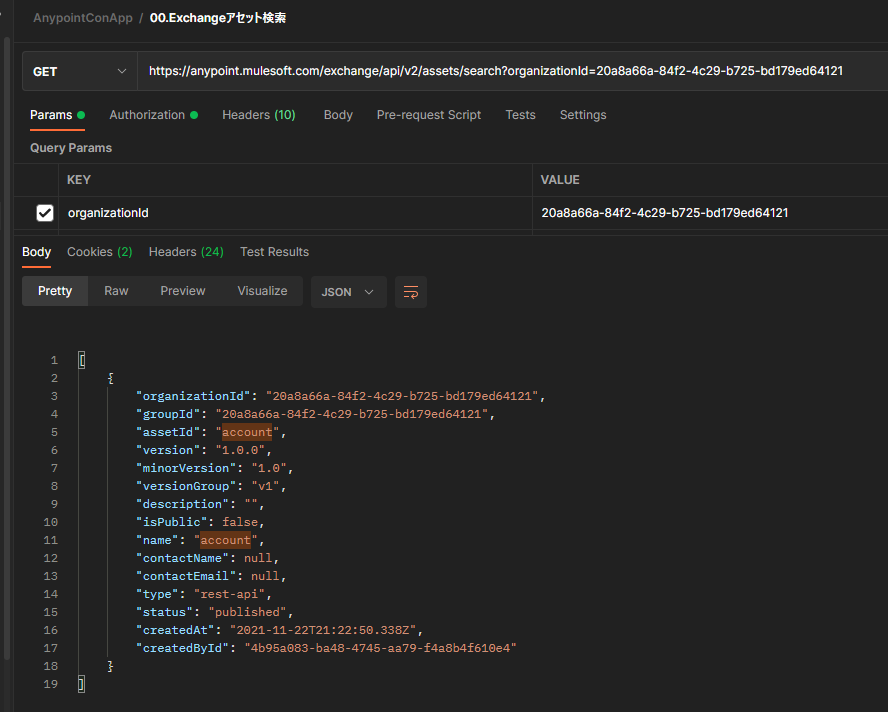
Echangeアセットを更新する。
URL: PATCH https://anypoint.mulesoft.com/exchange/api/v2/assets/{groupId}/{assetId}
Headers:
  Content-Type: application/json
  Authorization: Bearer {AccessToken}
RequestBody:
{
  "name": "Access Control - Root",
  "description": "アクセス制御ルート"
  ---
}
Exchangeアセットを削除する。
URL: DELETE https://anypoint.mulesoft.com/exchange/api/v2/assets/{groupId}/{assetId}
Headers:
  X-Delete-Type: hard-delete
Authorization: Bearer {AccessToken}2.API Managerのアセット情報を検索する。
DevOpsでは、APIインスタンスのExchangeのアセットバージョン情報を最新に更新する際に、アセット情報を検索する。
URL: GET
https://anypoint.mulesoft.com/apimanager/api/v1/organizations/{organizationId}/environments/{environmentId}/apis?latestVersionsOnly=true&limit=50&offset=0&searchTerm=acc
Headers:
Authorization: Bearer {AccessToken}3.APIインスタンス情報を操作(検索・登録・更新・削除)する。
APIインスタンスを検索する。
URL: GET https://anypoint.mulesoft.com/apimanager/api/v1/organizations/{organizationId}/environments/{environmentId}/apisAPIインスタンスを登録する。
URL: POST https://anypoint.mulesoft.com/apimanager/api/v1/organizations/{organizationId}/environments/{environmentId}/apis
Headers:
  Content-Type: application/json
  Authorization: Bearer {AccessToken}
RequestBody:
{
    "endpoint": {
        "deploymentType": "CH",
        "isCloudHub": null,
        "muleVersion4OrAbove": true,
        "proxyUri": null,
        "referencesUserDomain": null,
        "responseTimeout": null,
        "type": "raml",
        "uri": "https: //api.accenture.com/"
    },
    "providerId": null,
    "instanceLabel": null,
    "spec": {
        "assetId": "account",
        "groupId": "c3c88d41-d311-496f-9e43-1b40d00f59a9",
        "version": "1.0.0"
    }
}
APIインスタンスを更新する。
URL: PATCH https://anypoint.mulesoft.com/apimanager/api/v1/organizations/{organizationId}/environments/{environmentId}/apis/{environmentApiId}
Headers:
  Content-Type: application/json
  Authorization: Bearer {AccessToken}
RequestBody:
{
    "assetVersion": "1.0.1"
}
APIインスタンスを削除する。
URL: DELETE  https://anypoint.mulesoft.com/apimanager/api/v1/organizations/{organizationId}/environments/{environmentId}/apis/{environmentApiId}
Headers:
  Authorization: Bearer {AccessToken}
4.SLA層情報を操作(検索・登録・更新・削除)する。
SLA層を検索する。
URL: GET https://anypoint.mulesoft.com/apimanager/api/v1/organizations/{organizationId}/environments/{environmentId}/apis/{environmentApiId}/tiers
Headers:
  Content-Type: application/json
  Authorization: Bearer {AccessToken}
SLA層を登録する。
URL: POST https://anypoint.mulesoft.com/apimanager/api/v1/organizations/{organizationId}/environments/{environmentId}/apis/{environmentApiId}/tiers
Headers:
  Content-Type: application/json
  Authorization: Bearer {AccessToken}
RequestBody:
{
    "apiVersionId": 17139603,
    "status": "ACTIVE",
    "autoApprove": false,
    "limits": [
        {
            "visible": true,
            "timePeriodInMilliseconds": 3600000,
            "maximumRequests": 10000
        }
    ],
    "name": "SLA for API"
}
SLA層を更新する。
URL: PUT https://anypoint.mulesoft.com/apimanager/api/v1/organizations/{organizationId}/environments/{environmentId}/apis/{environmentApiId}/tiers/{tierId}
Headers:
  Content-Type: application/json
  Authorization: Bearer {AccessToken}
RequestBody:
{
    "audit": {
        "created": {
            "date": "2021-08-09T01:10:21.233Z"
        },
        "updated": {
        }
    },
    "masterOrganizationId": "c3c88d41-d311-496f-9e43-1b40d00f59a9",
    "organizationId": "c3c88d41-d311-496f-9e43-1b40d00f59a9",
    "id": 819277,
    "name": "SLA for API EDIT2",
    "description": null,
    "limits": [ {
            "visible": true,
            "timePeriodInMilliseconds": 3600000,
            "maximumRequests": 10000
        }
    ],
    "status": "ACTIVE",
    "autoApprove": false,
    "applicationCount": 0,
    "apiId": 17139603
}
SLA層を削除する。
URL: DELETE https://anypoint.mulesoft.com/apimanager/api/v1/organizations/{organizationId}/environments/{environmentId}/apis/{environmentApiId}/tiers/{tierId}
Headers:
  Authorization: Bearer {AccessToken}
5.ポリシー情報を操作(検索・登録・更新・削除)する。
ポリシーを検索する。
URL: GET https://anypoint.mulesoft.com/apimanager/api/v1/organizations/{organizationId}/environments/{environmentId}/apis/{environmentApiId}/policies?fullInfo=false
Headers:
  Authorization: Bearer {AccessToken}
ポリシーを登録する。
URL: POST https://anypoint.mulesoft.com/apimanager/api/v1/organizations/{organizationId}/environments/{environmentId}/apis/{environmentApiId}/policies
Headers:
  Content-Type: application/json
  Authorization: Bearer {AccessToken}
RequestBody:
{
    "configurationData": {
        "inboundHeaders": [
            "jwt",
            "JWT",
            "Jwt"
        ]
    },
    "pointcutData": null,
    "policyTemplateId": 299243,
    "apiVersionId": 17139603,
    "groupId": "68ef9520-24e9-4cf2-b2f5-620025690913",
    "assetId": "header-removal",
    "assetVersion": "1.0.3"
}
ポリシーを更新する。
URL: PATCH https://anypoint.mulesoft.com/apimanager/api/v1/organizations/{organizationId}/environments/{environmentId}/apis/{environmentApiId}/policies/{policyId}
Headers:
  Content-Type: application/json
  Authorization: Bearer {AccessToken}
RequestBody:
{
    "configurationData": {
        "inboundHeaders": [
            "jwt",
            "JWT",
            "Jwt",
            "masaki"
        ]
    },
    "pointcutData": null,
    "policyTemplateId": 299243,
    "id": 2006463,
    "apiVersionId": 17139603,
    "groupId": "68ef9520-24e9-4cf2-b2f5-620025690913",
    "assetId": "header-removal",
    "assetVersion": "1.0.3"
}
ポリシーを削除する。
URL: DELETE https://anypoint.mulesoft.com/apimanager/api/v1/organizations/{organizationId}/environments/{environmentId}/apis/{environmentApiId}/policies/{policyId}
Headers:
  Authorization: Bearer {AccessToken}
6.APIアラート情報を操作(検索・登録・更新・削除)する。
APIアラートを検索する。
URL: GET https://anypoint.mulesoft.com/apimanager/api/v1/organizations/{organizationId}/environments/{environmentId}/apis/{environmentApiId}/alerts?limit=10000
Headers:
  Authorization: Bearer {AccessToken}
APIアラートを登録する。
URL: POST https://anypoint.mulesoft.com/apimanager/api/v1/organizations/{organizationId}/environments/{environmentId}/apis/{environmentApiId}/alerts
Headers:
  Content-Type: application/json
  Authorization: Bearer {AccessToken}
RequestBody:
{
    "apiAlertsVersion": "1.0.0",
    "name": "[API] account Request Count 500 execeeds",
    "type": "api-request-count",
    "enabled": true,
    "severity": "Warning",
    "recipients":[{
            "type": "user",
            "value": "52ac365e-841f-49c9-8bf3-79ab65fbcb2a",
            "firstName": "Masaki",
            "lastName": "Kawaguchi"
        }
    ],
    "condition": {
        "resourceType": "api-version",
        "aggregate": "COUNT",
        "operator": "GREATER_THAN",
        "value": 5000
    },
    "period": {
        "duration": {
            "count": 1,
            "weight": "MINUTES"
        },
        "repeat": 1
    }
}
APIアラートを更新する。
URL: PATCH https://anypoint.mulesoft.com/apimanager/api/v1/organizations/{organizationId}/environments/{environmentId}/apis/{environmentApiId}/alerts/{alertId}
Headers:
  Content-Type: application/json
  Authorization: Bearer {AccessToken}
RequestBody:
{
    "apiAlertsVersion": "1.0.0",
    "name": "[DR] account Request Count 500 execeeds EDIT2",
    "type": "api-request-count",
    "enabled": true,
    "severity": "Warning",
    "recipients": [
        {
            "type": "user",
            "value": "52ac365e-841f-49c9-8bf3-79ab65fbcb2a",
            "firstName": "Masaki",
            "lastName": "Kawaguchi"
        }
    ],
    "condition": {
        "resourceType": "api-version",
        "aggregate": "COUNT",
        "operator": "GREATER_THAN",
        "value": 5000
    },
    "period": {
        "duration": {
            "count": 1,
            "weight": "MINUTES"
        },
        "repeat": 1
    },
    "id": "3ab955b1-7a38-4025-8236-37ed723b0925"
}
APIアラートを削除する。
URL: DELETE https://anypoint.mulesoft.com/apimanager/api/v1/organizations/{organizationId}/environments/{environmentId}/apis/{environmentApiId}/alerts/{alertId}
Headers:
  Authorization: Bearer {AccessToken}
7.アプリケーション情報を操作(検索・登録・更新・削除)する。
アプリケーションを検索する。
URL: GET https://anypoint.mulesoft.com/cloudhub/api/v2/applications
Headers:
  X-ANYPNT-ORG-ID: {organizationId}
  X-ANYPNT-ENV-ID: {environmentId}
  Authorization: Bearer {AccessToken}
アプリケーションを登録する。
URL: POST https://anypoint.mulesoft.com/cloudhub/api/v2/applications
Headers:
  X-ANYPNT-ORG-ID: {organizationId}
  X-ANYPNT-ENV-ID: {environmentId}
  Authorization: Bearer {AccessToken}
  Content-Type: multipart/form-data
RequestBody:
 appInfoJson:{
    "fileName": "account-v1.jar",
    "muleVersion": {
        "version": "4.3.0",
        "updateId": "61096cc9aba09016c54c9404"
    },
    "properties": {
        "anypoint.platform.config.analytics.agent.enabled": "false"
    },
    "logLevels":[
    ],
    "trackingSettings":{
        "trackingLevel": "DISABLED"
    },
    "deploymentGroup": null,
    "monitoringEnabled": true,
    "monitoringAutoRestart": true,
    "persistentQueues": false,
    "persistentQueuesEncrypted": false,
    "workers": {
        "amount": 1,
        "type": {
            "name": "Micro",
            "weight": 0.1,
            "cpu": "0.1 vCores",
            "memory": "500 MB memory"
        }
    },
    "objectStoreV1": false,
    "loggingNgEnabled": true,
    "loggingCustomLog4JEnabled": false,
    "staticIPsEnabled": false,
    "domain": "account-v2"
} Content-Type: application/json
 autoStart: true Content-Type: text/plane
 file: {ファイル}  Content-Type: application/octet-stream
アプリケーションを更新する。
URL: PUT https://anypoint.mulesoft.com/cloudhub/api/v2/applications/account-v2
Headers:
  X-ANYPNT-ORG-ID: {organizationId}
  X-ANYPNT-ENV-ID: {environmentId}
  Authorization: Bearer {AccessToken}
RequestBody:
  appInfoJson: {
    "monitoringEnabled": true,
    "monitoringAutoRestart": true,
    "persistentQueues": false,
    "persistentQueuesEncrypted": false,
    "workers": {
        "type": {
            "name": "Micro",
            "weight": 0.1,
            "cpu": "0.1 vCores",
            "memory": "500 MB memory"
        },
        "amount": 1,
        "remainingOrgWorkers": 0.9,
        "totalOrgWorkers": 1
    },
    "trackingSettings": {
        "trackingLevel": "DISABLED"
    },
    "properties": {
        "anypoint.platform.config.analytics.agent.enabled": "false",
        "aaaa": "aaaa"
    },
    "logLevels": [
    ],
    "lastUpdateTime": 1628477252334,
    "propertiesOptions": {
    },
    "secureDataGatewayEnabled": false,
    "staticIPsEnabled": false,
    "ipAddresses": [
    ],
    "loggingNgEnabled": true,
    "loggingCustomLog4JEnabled": false,
    "status": "STARTED",
    "hasFile": true,
    "fileName": "account-v1.1.jar",
    "objectStoreV1": false,
    "muleVersion": {
        "version": "4.3.0",
        "updateId": "61096cc9aba09016c54c9404"
    }
} Content-Type: application/json
アプリケーションを削除する。
URL: DELETE https://anypoint.mulesoft.com/cloudhub/api/v2/applications/account-v1
Headers:
  X-ANYPNT-ORG-ID: {organizationId}
  X-ANYPNT-ENV-ID: {environmentId}
Authorization: Bearer {AccessToken}8.ランタイムアラート情報を操作(検索・登録・更新・削除)する。
ランタイムアラートを検索する。
URL: GET https://anypoint.mulesoft.com/cloudhub/api/v2/alerts
Headers:
  X-ANYPNT-ORG-ID: {organizationId}
  X-ANYPNT-ENV-ID: {environmentId}
  Authorization: Bearer {AccessToken}
ランタイムアラートを登録する。
URL: POST https://anypoint.mulesoft.com/armui/api/v1/alerts/cloudhub
Headers:
  Content-Type: application/json
  X-ANYPNT-ORG-ID: {organizationId}
  X-ANYPNT-ENV-ID: {environmentId}
  Authorization: Bearer {AccessToken}
RequestBody:
{
    "name": "[DEV] All Application alert",
    "severity": "WARNING",
    "actions": [{
            "type": "email",
            "content":"Hello,\\nYou are receiving this alert because:\\nThe application ${resource} is now in an ^$^{state^} state, based on the condition 'CPU ^$^{operator^} ^$^{value^}^%'.",
            "subject": "${severity}: CPU usage ${state}",
            "userIds":[
                "52ac365e-841f-49c9-8bf3-79ab65fbcb2a"
            ]
        }
    ],
    "condition": {
        "operator": "GREATER_THAN",
        "periodCount": 10,
        "value": 80,
        "resourceType": "cloudhub-application",
        "type": "cpu",
        "periodMins": 1,
        "resources": [
            "*"
        ]
    }
}
ランタイムアラートを更新する。
URL: PUT https://anypoint.mulesoft.com/armui/api/v1/alerts/cloudhub/{alertId}
Headers:
  Content-Type: application/json
  X-ANYPNT-ORG-ID: {organizationId}
  X-ANYPNT-ENV-ID: {environmentId}
  Authorization: Bearer {AccessToken}
RequestBody:
{
    "name": "[DEV] All Application alert EDIT2",
    "severity": "WARNING",
    "actions": [
        {
            "type": "email",
            "content":"Hello,\\nYou are receiving this alert because:\\nThe application ${resource} is now in an ${state} state, based on the condition 'CPU ${operator} ${value}%.",
            "subject":"${severity}: CPU usage ${state}",
            "userIds": [
                "52ac365e-841f-49c9-8bf3-79ab65fbcb2a"
            ]
        }
    ],
    "condition": {
        "operator": "GREATER_THAN",
        "value": 80,
        "periodCount": 10,
        "resourceType": "cloudhub-application",
        "type": "cpu",
        "periodMins": 1,
        "resources": [
            "*"
        ]
    }
}
ランタイムアラートを削除する。
URL: DELETE https://anypoint.mulesoft.com/armui/api/v1/alerts/cloudhub/{alertId}
Headers:
  X-ANYPNT-ORG-ID: {organizationId}
  X-ANYPNT-ENV-ID: {environmentId}
  Authorization: Bearer {AccessToken}
さいごに
いかがだったでしょうか?
DevOpsを構築するために、必要なAnypoint PlatformのAPIについて説明しました。
技術検証してみると、DevOpsを構築するためには”Exchange API”や”API Manager API”、”CloudHub API”を利用することが分かりました。
一から一つ一つリクエスト情報を調べるには時間がかかるので、是非活用してみてください。では、


